Most of my experience as an ex-sysadmin with web services is with SOAP. And I couldn't speak about experience; the only thing I had to do back in these days was to setup Tomcat and Axis to host mysterious "SOAP" applications.
As soon as I started reading the manuals of Tomcat and Axis at each of these installations, I quickly ran away -- not only couldn't I understand anything, but these docs all started with the idea that whoever was reading them had a strong knowledge of Web Services and/or Java. Which, of course, I didn't.
At a high level, I understand what SOAP is. But since I've jumped in system architecture, what I've been hearing recently is this:
"We're modeling our web services architecture on REST".
Oh no, not a new buzzword. Wasn't SOAP complex enough? What the heck is REST?
Fear no more. It turns out REST has been out there for a while. A long, long while. On the web before many didn't know what the web was.
Anyone who knows the basics of HTTP will understand REST quickly. REST is not a heavy, XML-based protocol as in SOAP. It's a way of doing things the simple way, using straight HTTP to transfer information in - sorry if I interpret things little too much here - an ad hoc manner. No freaking XML and standards. Thus, your web browser is a REST client. If you want to go a little more deeper, another example would be Amazon's S3 which is a more complex service based on REST. In fact, if a service doesn't use SOAP, it probably uses REST.
REST is how anyone with a good-enough basic knowledge of HTTP, but doesn't give a shit about XML and layered protocols, will natively think web services should work. The way things should be. I'm hardwired to think this way, and SOAP always had me thinking that it was way overkill for a lot of uses.
I'm currently reading the following tutorial:
http://rest.elkstein.org/
Go read it, it is very well written.
Also take a look at the comment page here. Dr. Elkstein gives there a rough comparison between RPC, SOAP, REST.
O.

Tuesday, September 28, 2010

Friday, September 17, 2010
Building a low-power FreeNAS Server: Part 3
My FreeNAS Server has been up for a week.
I assembled everything in my parts list and I'm glad to report that all components worked as predicted. I did not have any surprise.
Assembling a homebrew computer is a nice activity for kids. My 7-year old helped me plug all the headers and assemble the case. Counting all the explanations I had to give to him, we were over in a little over 30 minutes.
I then used m0n0wall's physdiskwrite to write an embedded amd64 image of FreeNAS directly on a leftover 1GB flash card I had from an HP tradeshow. Then I plugged it on my USB-header-to-USB-plug thingy directly inside the case. The two hard disks are not used to boot FreeNAS at all; their purpose is only to hold data.
I happen to no longer have any computer screens; I only have laptops at home. So I hooked up the PC to my flat screen TV to configure the BIOS and do the initial FreeNAS configuration.
There are a two things about using a mini-itx desktop board I don't like:
Now I've got a bootable system, and it works well. My next task is to ensure that it consumes the less power possible. I already configured hard disk spindowns but I'll try to see if I can do something with wake-on-lan. More to come later!
I assembled everything in my parts list and I'm glad to report that all components worked as predicted. I did not have any surprise.
Assembling a homebrew computer is a nice activity for kids. My 7-year old helped me plug all the headers and assemble the case. Counting all the explanations I had to give to him, we were over in a little over 30 minutes.
I then used m0n0wall's physdiskwrite to write an embedded amd64 image of FreeNAS directly on a leftover 1GB flash card I had from an HP tradeshow. Then I plugged it on my USB-header-to-USB-plug thingy directly inside the case. The two hard disks are not used to boot FreeNAS at all; their purpose is only to hold data.
I happen to no longer have any computer screens; I only have laptops at home. So I hooked up the PC to my flat screen TV to configure the BIOS and do the initial FreeNAS configuration.
There are a two things about using a mini-itx desktop board I don't like:
- The Intel Desktop BIOS does not support console redirection (at least I didn't see any mention of this anywhere) so you need to configure it the old way with a screen and a keyboard;
- The built-in video card, needed by the BIOS, cannot be deactivated. Its video memory is, naturally, shared with the system memory and the lowest memory footprint is 128Mb. That ended up taking 10% of the 1Gb of RAM in my server. Not a problem since I'll never need that gig, but a hassle anyway.
Now I've got a bootable system, and it works well. My next task is to ensure that it consumes the less power possible. I already configured hard disk spindowns but I'll try to see if I can do something with wake-on-lan. More to come later!
Tuesday, September 14, 2010
Adding a DynDNS client to OpenWRT's LuCI
OpenWRT is terrific. The more I play with it, the more I like it. Even though I used to be a UNIX administrator (and a good-enough one, I think), I prefer using the LuCI interface as much as I can, keeping the CLI for repetitive tasks or debugging. LuCI is completely modular and lets you add packages depending on your specific needs. This is a good thing; it removes clutter from the interface and saves some precious space on your flash.
As an example, the following is a quick procedure that shows you how to add a DynDNS client functionality in LuCI.
Log into LuCI and switch to Administration mode.
Go into Overview -> LuCI Components.
In the Available Packages panel, install the luci-app-ddns package.
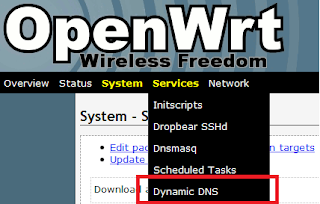 A Dynamic DNS menu entry will appear automagically.
Inside this menu, you can then add your DynDNS settings as usual. It might take a while before OpenWRT updates your status; be patient.
O.
As an example, the following is a quick procedure that shows you how to add a DynDNS client functionality in LuCI.
Log into LuCI and switch to Administration mode.
Go into Overview -> LuCI Components.
In the Available Packages panel, install the luci-app-ddns package.
 A Dynamic DNS menu entry will appear automagically.
Inside this menu, you can then add your DynDNS settings as usual. It might take a while before OpenWRT updates your status; be patient.
O.
Friday, September 3, 2010
The RNX-GX4, a well-priced Broadcom router
Remember how I blogged about OpenWRT and Broadcom routers a few months ago? Turns out I've been looking for a new router and I found one which did what I wanted at a good price:
 I introduce you to Rosewill's RNX-GX4. This is a rebranded Netcore NW618, a chinese router which is not available this side of the Pacific. What makes this router special is that it is tested with, and officially supports, DD-WRT at a reasonable price -- I got mine on sale, at almost a quarter of the price of a WRT54GL. It has the same quantity of RAM and flash as the WRT54GL, but a faster CPU. It's not a straight WRT54GL clone; there are some differences such as a serial flash chip which isn't as common as parallel flash. But the patches have been submitted to the various distributions, and up until now, it has been working well.
What further sets it apart from many other low-cost routers is how Rosewill openly brags about how it runs a BCM5354KFBG 240MHz CPU in the technical specs online, and even on the back of the retail box. When you see things like this, you know it is made for geeks. I also appreciate that the antennas can be removed. I don't intend to use the wireless radio on this device, so I'll put them out of the way.
I've started playing with it tonight. My intention is to replace my m0n0wall PC with a RNX-GX4 running OpenWRT. While I like m0n0wall very much, running it on a generic PC takes some real estate and electricity, and using a smaller devices would be a better fit. I've investigated purchasing an Alix board, to keep running M0n0wall, but there are many, many times the price of the RNX-GX4 so I decided against using one.
O.
 I introduce you to Rosewill's RNX-GX4. This is a rebranded Netcore NW618, a chinese router which is not available this side of the Pacific. What makes this router special is that it is tested with, and officially supports, DD-WRT at a reasonable price -- I got mine on sale, at almost a quarter of the price of a WRT54GL. It has the same quantity of RAM and flash as the WRT54GL, but a faster CPU. It's not a straight WRT54GL clone; there are some differences such as a serial flash chip which isn't as common as parallel flash. But the patches have been submitted to the various distributions, and up until now, it has been working well.
What further sets it apart from many other low-cost routers is how Rosewill openly brags about how it runs a BCM5354KFBG 240MHz CPU in the technical specs online, and even on the back of the retail box. When you see things like this, you know it is made for geeks. I also appreciate that the antennas can be removed. I don't intend to use the wireless radio on this device, so I'll put them out of the way.
I've started playing with it tonight. My intention is to replace my m0n0wall PC with a RNX-GX4 running OpenWRT. While I like m0n0wall very much, running it on a generic PC takes some real estate and electricity, and using a smaller devices would be a better fit. I've investigated purchasing an Alix board, to keep running M0n0wall, but there are many, many times the price of the RNX-GX4 so I decided against using one.
O.
Building a low-power FreeNAS Server: Part 2
Part 2 of my series will be a shopping list of the materials I've picked to build by FreeNAS server.
Everything starts with the motherboard. I was looking for a low-power Mini-ITX board that had a built-in gigabit ethernet controller and I've decided to pick an Intel D510MO. This is a desktop board based on the Atom processor which is cheap and low power. There were third-party Atom boards that were maybe 10-15$ less than the Intel-branded one, but some reviewers complained on excessive heat and I didn't want to have heat problems. I was initially looking into the VIA C7 platform but it can't beat the Atom in terms of performance. I still don't know if the intel BIOS built on this board can work on a serial console. That would be surprising, but I will keep you posted.
I purchased two 1Tb Seagate 7200 RPM SATA disks -- nothing special here, except that 7200RPM was an imported factor for me. I want these disks to be as fast as possible when I'm copying large amounts of data.
For the case, I picked a cheap MicroATX one. Why MicroATX? Because Mini-ITX cases are expensive, and usually can't fit more than one hard disk. I selected a R102-P from Rosewill which happened to be 20$ on Newegg. That case is not only cheap, but it can hold 4 hard disks (which doesn't seem too common on MicroATX cases) and the front is very well ventilated with a lot of air holes right in front of the disks.
The case doesn't come with a power supply. And I didn't want to; since I was looking to be the most power-efficient possible, I picked a 80-Plus 250W power supply from Sparkle. 250W for an ATX form factor is also not that common, but I was really looking into getting what I need and not more -- an idling 500W PS consumes more power and one rated at 250W.
The last thing I bought is a gizmo made by Koutech - an adapter that converts a 10 pin USB header into a standard USB plug. Using this, I can put FreeNAS on a small USB key, and plug that key directly on the motherboard inside the case -- no dangling key outside the box. The motherboard doesn't have an IDE header, so I couldn't use a more common IDE to CF card converter. We'll see how this goes.
That's it for now. I'm currently in the process of having all this shipped to me and I will soon see how things work out.
Everything starts with the motherboard. I was looking for a low-power Mini-ITX board that had a built-in gigabit ethernet controller and I've decided to pick an Intel D510MO. This is a desktop board based on the Atom processor which is cheap and low power. There were third-party Atom boards that were maybe 10-15$ less than the Intel-branded one, but some reviewers complained on excessive heat and I didn't want to have heat problems. I was initially looking into the VIA C7 platform but it can't beat the Atom in terms of performance. I still don't know if the intel BIOS built on this board can work on a serial console. That would be surprising, but I will keep you posted.
I purchased two 1Tb Seagate 7200 RPM SATA disks -- nothing special here, except that 7200RPM was an imported factor for me. I want these disks to be as fast as possible when I'm copying large amounts of data.
For the case, I picked a cheap MicroATX one. Why MicroATX? Because Mini-ITX cases are expensive, and usually can't fit more than one hard disk. I selected a R102-P from Rosewill which happened to be 20$ on Newegg. That case is not only cheap, but it can hold 4 hard disks (which doesn't seem too common on MicroATX cases) and the front is very well ventilated with a lot of air holes right in front of the disks.
The case doesn't come with a power supply. And I didn't want to; since I was looking to be the most power-efficient possible, I picked a 80-Plus 250W power supply from Sparkle. 250W for an ATX form factor is also not that common, but I was really looking into getting what I need and not more -- an idling 500W PS consumes more power and one rated at 250W.
The last thing I bought is a gizmo made by Koutech - an adapter that converts a 10 pin USB header into a standard USB plug. Using this, I can put FreeNAS on a small USB key, and plug that key directly on the motherboard inside the case -- no dangling key outside the box. The motherboard doesn't have an IDE header, so I couldn't use a more common IDE to CF card converter. We'll see how this goes.
That's it for now. I'm currently in the process of having all this shipped to me and I will soon see how things work out.
Monday, August 30, 2010
Building a low-power FreeNAS Server: Part 1
I've been looking into having a small file server in my home, to store my photographs and iTunes library. The most important aspects of that file server are, in order:
So I decided to build my own NAS instead. It will most probably be based on FreeNAS, assuming it is hackable enough to my taste. The overall price is below the DS-210j, and I expect performance to be up to my expectations. Low power being paramount, I had to hand pick all the components and my next posts will detail what I've chosen, and how I'll be building it. I'll try to put some nice pictures.
O.
- Low power requirements: It is on 24/7 and I want don't want to consume too much power
- RAID-1: I want my data to be protected in case the hard disk crashes
- Low cost
- Good performance
- Expandability: Nice features such as a bittorrent client are a plus, I want to be able to experiment with DLNA in the future, so the "hackability" factor is important.
So I decided to build my own NAS instead. It will most probably be based on FreeNAS, assuming it is hackable enough to my taste. The overall price is below the DS-210j, and I expect performance to be up to my expectations. Low power being paramount, I had to hand pick all the components and my next posts will detail what I've chosen, and how I'll be building it. I'll try to put some nice pictures.
O.
Thursday, August 19, 2010
wuauclt.exe and svchost.exe taking memory on XP
Update 2010-08-21: The thread here indicates that Microsoft is investigating this as a priority 1 issue.
Normally I don't post PC and Windows-related stuff but there are not many recent posts on this August 2010 issue, so here it is.
I support my own PCs and those used by the extended family. For a few days a staggering issue has been happening. When configuring a Windows XP PC to use Microsoft Update (rather than the good old Windows update), svchost.exe and wuauclt.exe take so much memory that a low-memory PC (512Mb) will start swapping enough to freeze the whole system. I saw this happening on SP2 and SP3.
Yes, 512Mb is not a lot, but before calling me stupid, note that 512Mb used to be the standard configuration a few years ago for many low-end systems and it is officially supported by XP. That bug makes any low-memory PC unusable.
You should note that installing Microsoft Security Essentials switches any PC silently from WU to MU. That's how I introduced the problem and noticed it the first time on a laptop. I was about to reinstall it but found out that there have been some user reports here and here. Microsoft has not released a patch yet but I am sure many corporate users have stumbled on this problem and reported it officially.
The workaround in the mean time consists of connecting to Microsoft Update and choose to stop using Microsoft Update. The PC will revert to using Windows Update and everything will be working normally again.
O.
Normally I don't post PC and Windows-related stuff but there are not many recent posts on this August 2010 issue, so here it is.
I support my own PCs and those used by the extended family. For a few days a staggering issue has been happening. When configuring a Windows XP PC to use Microsoft Update (rather than the good old Windows update), svchost.exe and wuauclt.exe take so much memory that a low-memory PC (512Mb) will start swapping enough to freeze the whole system. I saw this happening on SP2 and SP3.
Yes, 512Mb is not a lot, but before calling me stupid, note that 512Mb used to be the standard configuration a few years ago for many low-end systems and it is officially supported by XP. That bug makes any low-memory PC unusable.
You should note that installing Microsoft Security Essentials switches any PC silently from WU to MU. That's how I introduced the problem and noticed it the first time on a laptop. I was about to reinstall it but found out that there have been some user reports here and here. Microsoft has not released a patch yet but I am sure many corporate users have stumbled on this problem and reported it officially.
The workaround in the mean time consists of connecting to Microsoft Update and choose to stop using Microsoft Update. The PC will revert to using Windows Update and everything will be working normally again.
O.
Subscribe to:
Posts (Atom)